
How to implement SwiperJs slides with IONIC 1.x

With the release of V1.2, Ionic announced support for SwiperJS through the new ion-slides directive. The older ion-slidebox was deprecated in favour of ion-slides, which wraps SwiperJS directly and exposes its full API surface. At the time, documentation was sparse and many developers were confused about how to obtain a reference to the underlying Swiper instance inside an AngularJS controller — which is what this post addresses.
Here is the original Ionic forum thread where this solution was first posted.
The core problem
The challenge with ion-slides in Ionic 1.x is that ion-slides initialises SwiperJS asynchronously. If you try to call swiper methods immediately in your controller, the Swiper instance may not exist yet. The solution is to listen for the $ionicSlides.sliderInitialized event, which fires once the underlying Swiper object is ready.
AngularJS Controller
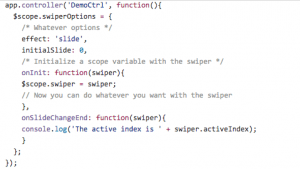
The key pattern is subscribing to $ionicSlides.sliderInitialized on the $scope and storing the event.detail.slider reference. Once you have the Swiper instance, you can call any SwiperJS API method — slideTo(), slideNext(), getActiveIndex() — directly from your controller logic.
HTML template
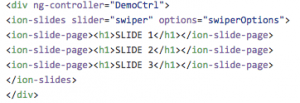
Pass the options attribute to ion-slides as a reference to an object defined on your scope. This object accepts any standard SwiperJS parameter — effect, speed, loop, autoplay, pagination and so on — giving you full control over slide behaviour without modifying the directive itself.
Common SwiperJS parameters for ion-slides
The most frequently used parameters when configuring ion-slides in Ionic 1.x include:
- effect — the slide transition type:
slide(default),fade,cube,coverflow, orflip. - speed — the transition duration in milliseconds. Default is 300.
- loop — set to
trueto enable continuous looping of slides. - autoplay — an integer (milliseconds) to auto-advance slides, or an object with
delayanddisableOnInteractionproperties. - pagination — an object or selector string to wire up dot-style navigation indicators.
- slidesPerView — the number of slides visible at once. Useful for gallery-style layouts.
Update: modern Ionic (v6+) and SwiperJS v8+
This post covers Ionic 1.x with AngularJS, which is now several major versions behind. If you are using Ionic 6 or later with React, Vue, or Angular, the integration is different: Ionic dropped its own ion-slides wrapper in Ionic 6 and now recommends using the SwiperJS component directly via its framework-specific packages (swiper/react, swiper/vue, swiper/angular). The underlying SwiperJS API is consistent across versions, but the initialisation pattern differs significantly from the AngularJS approach described here. The concepts of options, programmatic slide control, and event handling all carry over — only the wiring syntax changes.
References
- The full list of SwiperJS parameters — effect, speed, loop, pagination, navigation and more — is documented on the official SwiperJS API page.
- The SwiperJS demos page provides working examples of every built-in transition effect.
- Example Gist with the complete controller and template from this post.
With Ionic 1.2's support for SwiperJS, hybrid mobile developers gained access to one of the best touch-slider libraries available. The same SwiperJS library remains the recommended solution for Ionic apps today — only the integration layer has changed across Ionic's major versions. Happy coding!
Srijith R.
Squash Apps engineering team